Why We Built an Open Source Website Audit CLI
Most website audit tools tell you what is wrong. We wanted one that could show us where it is wrong, why it matters, and what needs to be fixed.
Most website audit tools tell you what is wrong. We wanted one that could show us where it is wrong, why it matters, and what needs to be fixed.
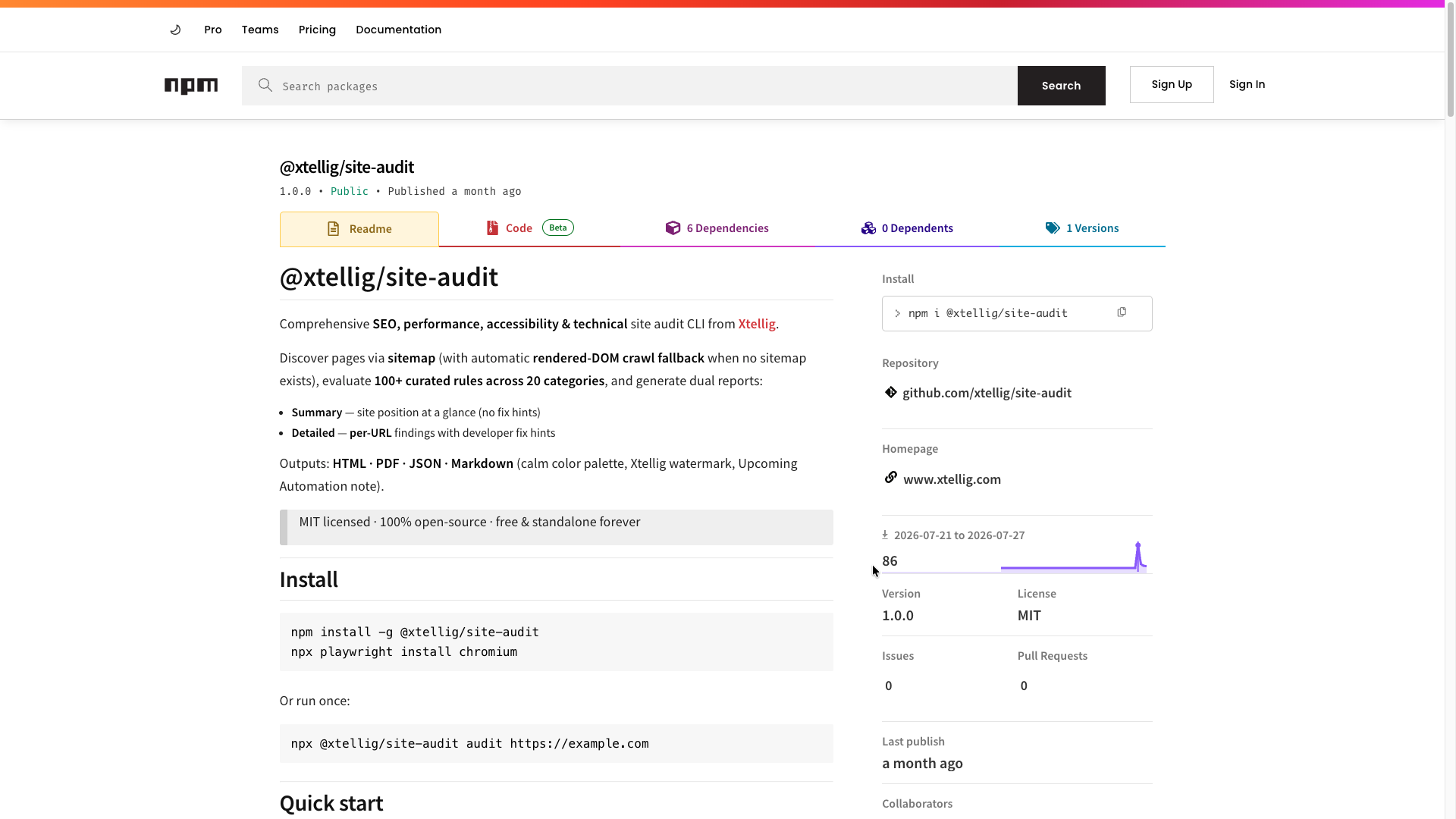
Building a website is only part of the work. Once a website is ready, there is another question that matters just as much: Is the website actually ready for users, search engines, and production? During our own development and QA workflows, we found ourselves switching between Lighthouse, SEO analyzers, accessibility checkers, sitemap validators, security tools, browser DevTools, and manual checks. Each tool gave us useful information, but the information was scattered across different platforms and every time wanted to run audit for each pages rather than see all pages information at once. So we decided to build a single tool to bring those checks together. Introducing @xtellig/site-audit - an open-source website auditing CLI designed to analyze SEO, performance, accessibility, security, crawlability, technical quality, AI/GEO readiness, and more from a single command.
1. The Challenge: Website Quality Is More Than an SEO Score
A website can have a good SEO score and still have serious technical problems. It can have:
- Missing image alt attributes
- Poor Core Web Vitals
- Broken internal links
- Missing security headers
- Incorrect canonical URLs
- Crawlability conflicts
- Invalid structured data
- Accessibility issues
- Poor mobile performance
- Missing AI/GEO signals
That meant a single SEO score was never enough for us. We wanted the audit to look at the website from multiple engineering perspectives. So we built the package around 20 audit categories and more than 100 curated rules. The goal was simple: Give the team one technical picture of the website instead of ten disconnected reports
2. Page Discovery: Don't Just Audit the Homepage
One of the first problems we solved was page discovery. A website audit is only useful if the tool can actually find the pages that need to be checked. The CLI first looks for common sitemap locations and also checks the Sitemap: declaration inside robots.txt. When a sitemap isn't available, the tool can automatically fall back to a rendered-DOM crawl using Playwright. This is important for modern websites where navigation can be generated through JavaScript. Instead of relying only on raw HTML links, the crawler can discover links that appear after the page is rendered, including navigation and previously hidden links. The crawler also:
- Keeps discovery same-origin
- Skips unnecessary assets
- Removes tracking parameters
- Supports configurable page limits
- Supports configurable crawl concurrency
- Allows users to force crawling with --crawl
This gives us a more realistic representation of what is actually accessible across the website.
3. More Than Just SEO
SEO is only one piece of website quality. Modern websites also need to perform well, remain accessible, stay secure, and be understandable by both search engines and AI systems. That's why the audit covers:
3.1 SEO
- Meta titles
- Meta descriptions
- Canonicals
- Heading structure
- Robots
- Sitemap
- Crawlability
3.2 Performance
- Core Web Vitals
- Lighthouse
- LCP
- CLS
- FCP
- TTFB
- HTML size
- Page weight
- Image optimization
3.3 Accessibility
- Heading hierarchy
- Labels
- Landmarks
- Color contrast
- Screen reader compatibility
- Lighthouse Accessibility
3.4 Technical Quality
- Broken links
- Redirect chains
- HTTP errors
- Duplicate metadata
- Structured data
- JSON-LD validation
3.5 Security
- HTTPS
- HSTS
- CSP
- X-Frame-Options
- Content-Type headers
- Referrer policies
3.6 AI & GEO Readiness
As AI search continues to grow, websites need to be understandable by more than traditional search engines. Our audit checks:
- llms.txt
- AI crawler accessibility
- Semantic HTML
- Content structure
- Schema consistency
These are areas many traditional SEO tools still ignore.
4. Built for Developers & Testers - Not Just Reports
Most website reports stop after saying: "This is wrong." We wanted to answer the next question: "How do I fix it?" Every failed rule includes:
- What failed
- Why it matters
- Current value
- Recommended fix
- Severity level
This allows developers to move directly from analysis to implementation without searching through documentation. The detailed report is designed to become a practical engineering checklist rather than just another scorecard.
5. Structured Data and JavaScript Rendering
Modern websites increasingly depend on JavaScript and structured data. So we didn't want to assume that the raw HTML tells the whole story. The audit checks:
- JSON-LD presence
- JSON-LD validity
- Schema @type
- Organization schema
- WebSite schema
- BreadcrumbList
- Schema versus visible content
It also compares raw HTML with the rendered page. The JavaScript rendering checks include:
- Server-side rendering or hybrid rendering
- Title availability in raw HTML
- H1 availability in raw HTML
- Description availability in raw HTML
- Canonical consistency
- JavaScript title modification
- Content availability without JavaScript
This helps identify pages where important SEO content depends too heavily on client-side rendering.
6. Two Reports for Two Different Audiences
We also realized that developers and stakeholders don't need the same information. That's why the package generates two report types.
6.1 Summary Report
The Summary report gives the overall position of the website. It includes:
- Executive scorecards
- SEO score
- Desktop performance
- Mobile performance
- Accessibility
- Best Practices
- Audit status
- Top critical and high-priority issues
- Category scores
- Page-by-page overview
It is designed to answer: "How healthy is this website?"
See a real example: View the Summary Report
6.2 Detailed Report
The Detailed report goes deeper. For every audited URL, it provides:
- Rule status
- Rule value
- Rule details
- Failure or warning explanation
- Developer fix hints
- Core Web Vitals
- Lighthouse results
- Crawlability information
- Security findings
- Accessibility findings
- SEO findings
- AI/GEO findings
It is designed to answer: "What exactly should we fix?" This separation allows a project manager to understand the overall website health without going through hundreds of technical checks, while developers and testers can still access every finding.
See a real example: View the Detailed Report
7. Open Source by Design
Many professional auditing platforms are expensive subscriptions. Others restrict exports, page limits or advanced features. We wanted something different. @xtellig/site-audit is:
- MIT Licensed
- Fully open-source
- Free forever
- Standalone
- No vendor lock-in
- No subscriptions
Install it once. Run it anywhere. Keep the reports forever.
8. Built Around Real Engineering Workflows
The CLI was designed for real development teams. You can:
- Audit staging environments
- Audit production websites
- Limit crawl size
- Run mobile or desktop Lighthouse
- Export HTML
- Export PDF
- Export Markdown
- Export JSON
- Integrate into GitHub Actions
- Use inside CI/CD pipelines
Whether you're reviewing one landing page or an enterprise website, the workflow stays the same.
9. Why We Open Sourced It
Every project goes through technical review before release. Over time, we built dozens of internal scripts covering SEO, accessibility, performance, and technical validation. Eventually we asked ourselves: Why should this only help our own team? So instead of keeping it internal, we packaged everything into an open-source CLI that anyone can use. Because better websites benefit everyone.
10. What's Coming Next
This is only the beginning. We're already building native automation workflows that connect website auditing directly into Autosocializer. Soon you'll be able to:
- Schedule recurring audits
- Trigger audits automatically after deployments
- Receive Slack and email notifications
- Monitor website quality over time
- Create tasks automatically from failed checks
Our goal isn't just auditing websites. It's making website quality part of the development workflow.
11. Final Thoughts
The web doesn't need another SEO score checker. It needs better engineering tools. @xtellig/site-audit was built to give developers, agencies, and product teams a complete technical picture of their websites in a single command.
One audit. One report. One workflow.
Because shipping great websites shouldn't require ten different tools.